Behind the scenes : Potpie SWE Bench Agent

Nandan
Introducing Potpie: AI Agents Built on Deep Code Understanding
Potpie is an open-source platform that brings AI agents to every stage of the software development lifecycle. What sets Potpie apart is its foundation: rather than treating code as flat text, Potpie constructs comprehensive knowledge graphs of entire repositories, capturing relationships between functions, classes, dependencies, and architectural patterns.
These knowledge graphs power intelligent inference engines that give AI agents true contextual awareness. When debugging an issue or implementing a feature, Potpie's agents form a deep understanding of how code flows through your system, maps code components, and intelligently figures out where changes might have cascading effects.
This graph-based approach enables agents to tackle complex SDLC tasks like automated testing, debugging, code analysis, and feature development with the kind of holistic understanding that typically requires deep familiarity with a codebase. By building rich semantic representations of codebases and layering agentic workflows on top, Potpie bridges the gap between traditional static analysis and modern AI-powered development.
Understanding SWE Bench: The Gold Standard for Coding Agents
SWE Bench has emerged as one of the most rigorous and widely-adopted benchmarks for evaluating AI coding agents. Unlike synthetic coding challenges, SWE Bench presents a unique proposition: real-world GitHub issues pulled from popular open-source repositories.
The benchmark works by evaluating whether an agent can generate file diffs that successfully resolve actual issues developers have faced. Each instance includes the original issue description, the repository context, and a test suite that validates whether the fix actually works. Agents are scored by applying their generated diffs to the codebase and running these pre-defined tests.
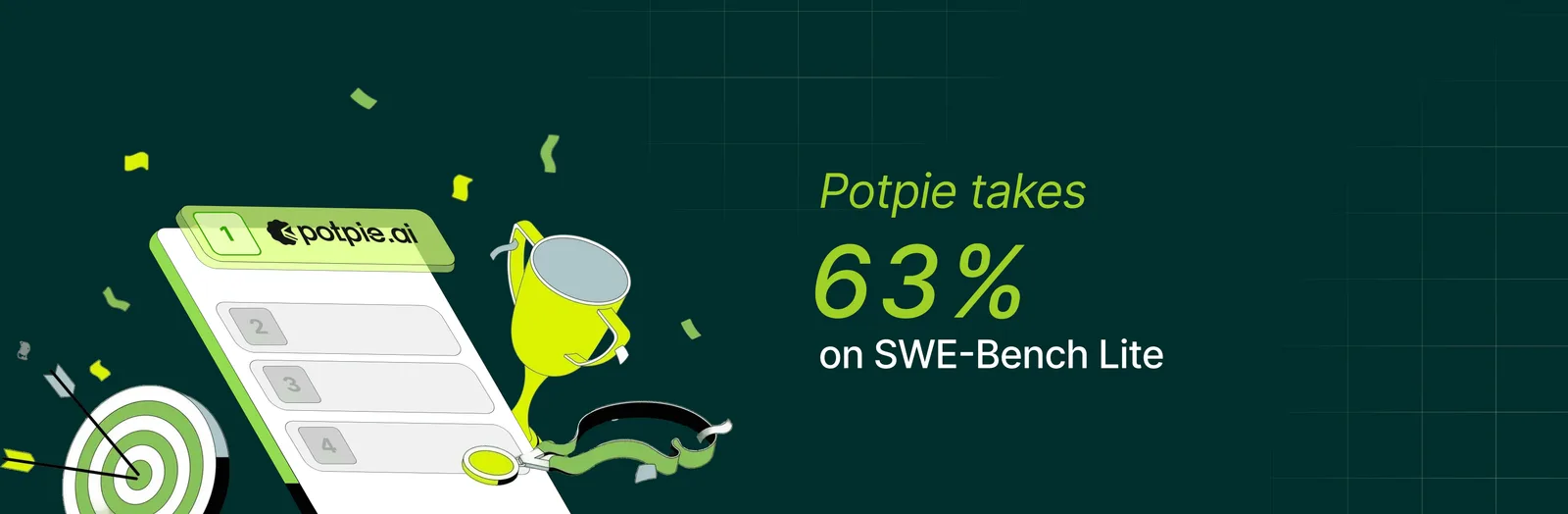
SWE Bench Lite, the most commonly referenced variant, contains 300 carefully curated instances spanning several prominent Python repositories including Django, Pylint, Matplotlib, and Scikit-learn. What makes this benchmark particularly challenging is that it requires agents to understand complex codebases, navigate real-world code patterns, and produce fixes that don't break existing functionality, mirroring the actual constraints software engineers face daily.
Potpie Custom Agents for the WIN !!!
For us, SWE-bench is more than just a metric, it’s a reality check. It’s where we prove that our graph-based approach to code understanding isn't just a cool theory, but a powerful tool that actually solves the messy, complex problems real developers face every day. If an agent can fix issues in Django's ORM or debug Pylint's AST parser, it demonstrates genuine understanding of complex codebases, not just pattern matching on toy examples.
This is where Potpie's Custom Agents shine. SWE Bench challenges require a specialized debugging workflow that's quite different from everyday features like generating new features or writing documentation. With Custom Agents, we can:
- Define task-specific instructions that guide the agent toward root cause analysis rather than superficial patches
- Shortlist relevant tools from Potpie's toolkit: ode search, dependency analysis, test execution is tailored to debugging workflows
- Encode debugging strategies like "explore the call chain," "check edge cases," or "verify assumptions with tests"
- Iterate rapidly on prompts and tool selection without rebuilding core infrastructure
For our SWE Bench agent, we've built a Custom Agent specifically optimized for the debugging loop: understand the issue, explore relevant code through the knowledge graph, hypothesize root causes, generate targeted fixes, and validate with tests.
What It Takes to Solve SWE Bench: Requirements and Reality
Fixing real-world GitHub issues requires far more than just chaining API calls together. It’s an exercise in high-level engineering that demands the same intuition and precision an experienced developer brings to a debugging session. When you move from a human engineer to an orchestrated AI agent, you aren't just solving a technical puzzle, you’re navigating a whole new frontier of execution and logic.
Key Challenges
Meeting these requirements in practice surfaces four critical challenges:
- Thinking Like a Software EngineerSolutions are rarely well-defined in the issue description
- Must identify and fix underlying problems, not just surface symptoms
- Handle edge cases that may not be explicitly mentioned
- Make decisions about the cleanest, most maintainable way to solve the problem
- Reason about code quality, architecture, and potential side effects
- Context EngineeringAgents may run for extended periods, processing tens of thousands of tokens
- At any point, the LLM must receive concise, precise tasks with exactly the relevant information
- Too much context leads to information overload and degraded performance
- Too little context means missing critical details needed to solve the problem
- Managing this attention budget is crucial for success
- Managing Trade-offsKnowing when to stop exploring and commit to a solution
- Choosing between multiple plausible fixes
- Deciding how much time to spend on reproduction vs. patch generation
- Balancing thoroughness against resource constraints
- These meta-decisions about resource allocation directly impact success rates
- Meeting All Requirements SimultaneouslyEvery requirement must be satisfied—there's no partial credit
- Agent might correctly identify the bug, navigate to the right file, and generate valid code, but miss a subtle edge case
- Or produce a fix that solves the immediate problem but breaks an unrelated test
- Missing even one requirement means complete failure on that instance
Core Requirements
A debugging agent needs four fundamental capabilities:
- Codebase ExplorationNavigate unfamiliar repositories efficiently
- Traverse call chains and dependency relationships
- Discover relevant code sections that may be hundreds of files away from the bug's surface symptoms
- Codebase IntelligenceUnderstand both syntax and semantics: builds deep understanding of how components interact, what invariants exist, where side effects propagate
- Leverage knowledge graphs to build contextual awareness of the entire system
- Structured AnalysisFollow systematic debugging workflows: reproduce the problem, form hypotheses, test assumptions
- Validate fixes against the issue requirements and existing test suites
- Avoid shotgun debugging in favor of strategic investigation
- Diff Patch GenerationProduce clean, minimal diffs that fix the issue without introducing regressions
- Respect repository patterns and conventions
- Ensure changes don't break existing functionality
Structured Problem Solving: Our Core Principles
Solving SWE Bench successfully requires more than just clever prompting—it demands a disciplined debugging methodology. We've distilled our approach into seven core principles that guide our agent's decision-making at every step:
1. Extract the Problem, Ignore Suggested Fixes
- Focus on what's actually broken, not the user's proposed solution
- Issue reporters often misdiagnose root causes or suggest suboptimal fixes
- The agent must independently identify the real problem from symptoms described
2. Verify Actual Behavior, Don't Trust User Symptoms
- Analyze the code execution path and logic flow
- User descriptions may be incomplete, outdated, or inaccurate
- Understand what the code actually does, not just what the issue claims
3. Fix Categories, Not Just Examples
- Address the underlying class of bugs, not just the specific instance mentioned
- If the issue shows one failing case, ensure all similar cases are handled
- Think in terms of patterns and edge cases, not isolated fixes
4. Fix at Source/Origin, Not Downstream
- Trace problems to their root cause
- Avoid band-aid solutions that patch symptoms while leaving the real bug intact
- A fix in the right place is simpler and more robust than multiple downstream patches
5. Preserve and Reuse Existing Code Patterns
- Match the repository's idioms, conventions, and architectural patterns
- Don't introduce novel approaches when the codebase has established patterns
- Consistency matters for maintainability and reduces regression risk
6. Trace Complete Flow Before Fixing
- Understand the full execution path from input to failure
- Map out how data flows through the system and where it transforms
- Premature fixes without complete understanding often miss edge cases
Our Step-by-Step Debugging Workflow
We guide our agent through a systematic eight-stage process that mirrors how experienced developers approach complex bugs:
1. Understand & Validate the Problem
- Parse the issue description to extract the core problem
- Separate symptoms from root causes
- Identify what should happen vs. what actually happens
- Clarify requirements and constraints
2. Explore & Hypothesize
- Navigate the codebase using Potpie's knowledge graph
- Identify relevant files, functions, and code paths
- Form initial hypotheses about potential causes
- Gather evidence to support or refute each hypothesis
3. Identify Root Cause
- Trace the complete execution flow
- Pinpoint where the actual problem originates
- Distinguish between symptoms and the underlying issue
- Verify understanding by analyzing code logic
4. Generalize the Issue
- Expand from the specific example to the broader pattern
- Identify all cases that could trigger the same bug
- Consider edge cases and boundary conditions
- Think like a repository maintainer: ensure the root cause is truly fixed, not just the symptom
- Verify existing utility functions and classes that could be reused
- Ensure the fix will handle the entire category of problems
5. Design Solution
- Determine where the fix should be applied (origin, not downstream)
- Choose an approach that aligns with existing code patterns
- Reuse patterns already established in the codebase
- Leverage existing utility functions and classes rather than reinventing solutions
- Plan minimal, focused changes
- Consider impact on related functionality
6. Scrutinize & Refine
- Review the proposed solution against all requirements
- Ensure changes are minimal and targeted—no unnecessary modifications
- Maintain code quality and readability as a repository maintainer would
- Check for potential regressions or side effects
- Ensure consistency with repository conventions
- Verify the solution keeps the codebase maintainable for future developers
- Validate that all edge cases are covered
7. Implement
- Generate clean, minimal diff patches
- Maintain single-file changes where possible
- Preserve existing code style and patterns
- Apply the fix at the source of the problem
8. Final Verification
- Confirm the solution addresses all requirements from the issue
- Ensure the fix is complete and self-contained
- Validate the patch is ready for evaluation
This systematic approach prevents the agent from jumping to premature solutions or missing critical requirements. Each stage builds on the previous one, creating a clear trail of reasoning that's both effective and debuggable. By thinking like a maintainer throughout the process, our agent produces patches that belong in the repository.
Enforcing the Methodology: Tools for Consistency
Having a clear debugging framework is one thing, getting an agent to actually follow it is another. LLMs are prone to shortcuts, skipping steps, or losing track of the bigger picture mid-execution. We solved this with two purpose-built tools that act as guardrails.
Todo Tool: Maintaining the Execution Plan
The todo tool keeps the agent on track throughout the debugging process:
- Created during planning: When the agent formulates its approach, it generates a structured todo list capturing each step
- Persistent task tracking: Todos remain visible across the agent's entire execution, preventing it from getting lost in details
- Checkpoints after each task: After executing any action, the agent reviews the todo list to determine the next step
- Prevents step-skipping: The agent can't jump from exploration directly to implementation—it must complete intermediate stages
- Maintains focus: Even during long-running investigations, the agent stays oriented toward the larger plan
Requirements Tool: The Verification Checklist
The requirements tool was a game-changer for consistency:
- Defined upfront: Agent creates a checklist of all requirements before starting execution
- Dynamic updates: As the agent discovers new constraints or edge cases, it adds them to the requirements list
- Strike irrelevant items: If initial assumptions prove wrong, the agent removes outdated requirements
- Mandatory verification: Before proposing any solution, the agent must check every requirement
- Pre-implementation gate: Agent validates all requirements are met before generating the final patch
- Prevents partial solutions: Ensures the agent doesn't ship a fix that solves 80% of the problem
The Impact
These tools transformed our agent from inconsistent to reliable. The todo tool ensures systematic execution, while the requirements tool guarantees completeness. Together, they've helped us produce fairly consistent results across diverse SWE Bench instances.he agent no longer improvises its way through debugging.Without these tools, even the best prompting can't prevent an agent from drifting off course. The todo and requirements tools externalise the debugging plan and success criteria, making them concrete artifacts the agent must engage with throughout execution.
How Our Agent Interacts with the Codebase
To truly master a codebase, you have to do more than just read lines of code; you have to grasp the entire ecosystem of the repository. It’s about mapping how components interact, tracking the nuance of logic flow, and recognizing the deep patterns that hold a project together. By fusing traditional developer tools with Potpie’s graph-based intelligence, our agent navigates complex codebases with the speed and precision of a seasoned architect.
Foundation: Knowledge Graph Construction
Before the agent starts working, Potpie parses the entire repository and constructs extensive knowledge graphs. These graphs capture relationships between functions, classes, methods, imports, and other code entities. We build AI inference on top of these graph nodes, enabling semantic understanding beyond simple text matching.
Traditional Navigation Tools
The agent uses standard bash tools extensively:
- grep for pattern matching across files
- find for locating files and directories
- blob for content inspection
- cat for reading file contents
- And many other unix utilities for file system navigation
These tools provide fast, precise access to specific code locations when the agent knows exactly what it's looking for.
Potpie-Specific Semantic Exploration: The Unfair Advantage
Traditional code navigation tools:grep, find, code search operate on a fundamental limitation: they see code as text. They can match patterns, find strings, and locate files, but they don't understand what the code does or how it fits into the larger system. For simple lookups, this is fine. For complex debugging? It's a serious handicap.
This is where Potpie's knowledge graph becomes a game-changer.
Beyond Text: Understanding Code Structure and Semantics
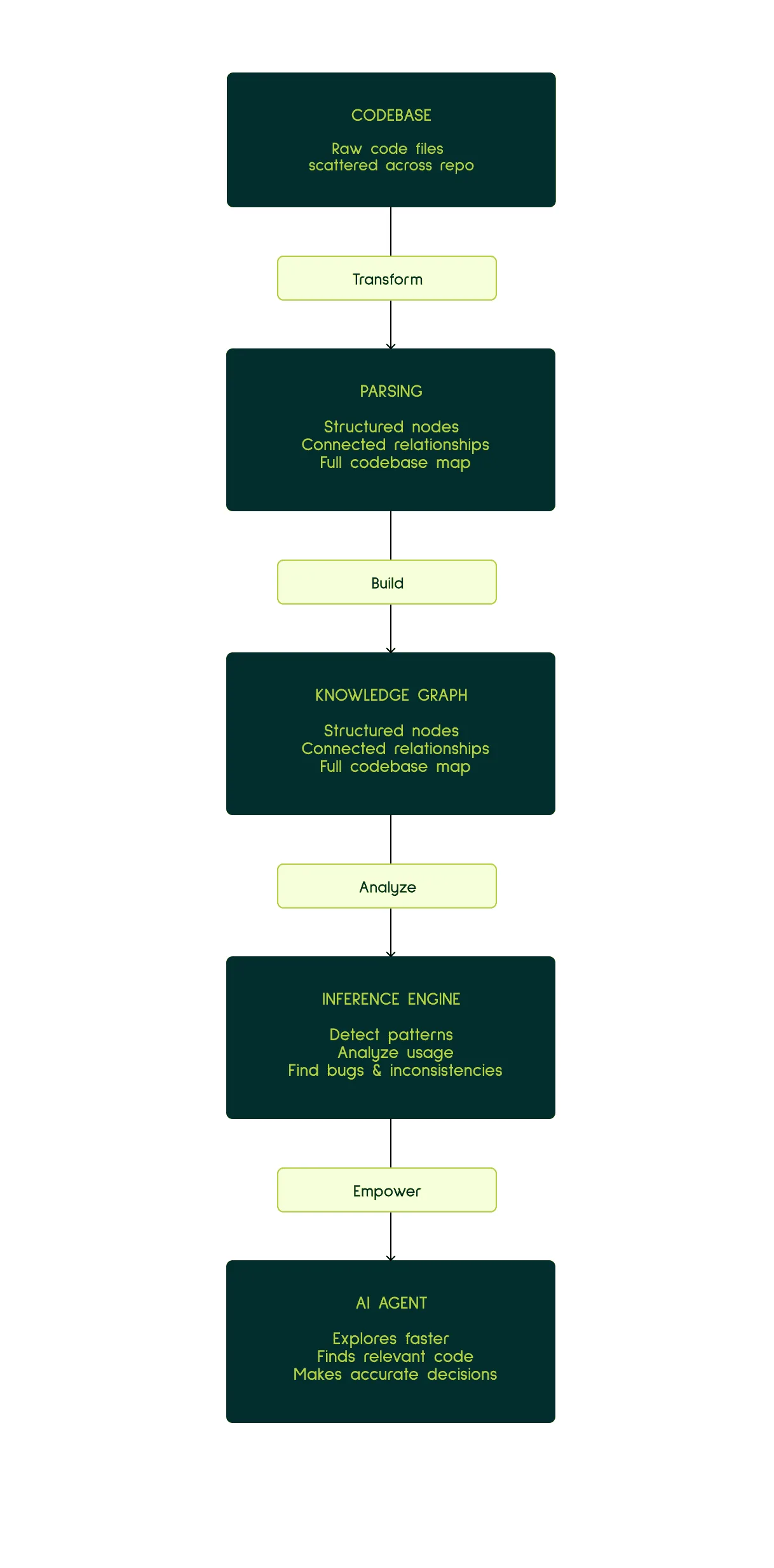
Potpie builds comprehensive knowledge graphs that represent your codebase across multiple hierarchies:
- Structural nodes: Files, classes, functions, methods, variables
- Behavioral nodes: API endpoints, database queries, event handlers
- Architectural nodes: Modules, packages, dependency clusters
- Relationship edges: Calls, imports, inheritance, data flow
But here's what makes it powerful: we run AI inference across these nodes in context. Each node isn't just a static label—it's enriched with deep insights about its functionality, its role in the system, and how it relates to surrounding code. The graph doesn't just know that function A calls function B; it understands why that relationship exists and what data flows between them.
Tools That Change Everything
1. AskKnowledgeGraphQueries: Semantic Code Search
Ask questions in natural language, get intelligent answers:
- "Find all authentication middleware" → Not just grep for "auth", but actual middleware components based on their role
- "Locate error handling patterns" → Discovers exception handling across the codebase, even with different naming conventions
- "Where is user input validated?" → Traces data flow from entry points to validation logic
Why this matters for SWE Bench: When an issue mentions "authentication fails for special characters," you need to find not just files with "auth" in the name, but the actual validation logic, input sanitization functions, and edge case handlers. Semantic search finds these based on what they do, not what they're called.
2. GetProbableNodeID: Natural Language to Code Mapping
Describe what you're looking for; get the specific code entity:
- "The function that parses SQL queries" → Points to the exact parser function
- "Middleware that handles CORS" → Identifies the CORS handler even if it's named something obscure
- "The class responsible for cache invalidation" → Finds it regardless of naming conventions
Why this matters for SWE Bench: Issue descriptions rarely use exact function names. They describe behavior: "the parser doesn't handle nested queries" or "caching breaks for concurrent requests." GetProbableNodeID bridges the gap between problem descriptions and actual code locations.
3. GetNodeNeighbours: Contextual Code Exploration
Understand code in its ecosystem:
- What calls this function? → Find all invocation sites, understand usage patterns
- What does it depend on? → Trace dependencies and shared state
- What else uses this pattern? → Discover similar implementations that might have the same bug
Why this matters for SWE Bench: Bugs rarely exist in isolation. A validation issue in one function often appears in similar functions. GetNodeNeighbours helps you find all the places that need fixing, not just the obvious example from the issue.
The Compound Effect: Where Potpie Shines
Here's where the knowledge graph creates outsized value for SWE Bench:
Root Cause Analysis
- Traditional: "This function throws an error" → grep for the function → read the code
- Potpie: "This function throws an error" → GetNodeNeighbours to see what calls it → AskKnowledgeGraphQueries to find where the bad input originates → Trace the data flow through the graph → Identify the actual source of invalid data
Pattern Recognition
- Traditional: Find one instance of the bug, fix it, hope there aren't more
- Potpie: Find one instance → Ask "what else uses this pattern?" → Knowledge graph returns all similar code structures → Fix the entire category of bugs
Understanding Impact
- Traditional: Make a fix, hope it doesn't break anything
- Potpie: Before fixing → GetNodeNeighbours shows everything that depends on this code → AI inference explains what each dependent expects → Design fix that satisfies all constraints
Edge Case Discovery
- Traditional: Read the issue, implement the obvious fix, miss edge cases
- Potpie: Semantic exploration finds related validation logic → Knowledge graph reveals edge cases already handled elsewhere → Agent reuses proven patterns
The Real Difference
Without knowledge graphs, agents are like developers working in an unfamiliar codebase with only grep and intuition. They can eventually figure things out, but it's slow and error-prone.
With Potpie's knowledge graphs, agents have something closer to a senior developer's mental model of the codebase: understanding not just where code is, but what it does, why it exists, and how it fits together.
This isn't a marginal improvement—it's the difference between stumbling through a dark room and having a map with annotations. For SWE Bench, where understanding complex, unfamiliar codebases quickly is critical, this is the foundation that makes systematic, reliable debugging possible.
Traditional tools answer "where is this string?" Potpie's knowledge graph answers "how does this system work?" That's not just a better tool—it's a fundamentally different capability. And for solving real-world bugs in production codebases, that difference is everything.
Keeping It Clean
Raw retrieval from large repositories would quickly overwhelm the context window. We've built several safeguards:
File Size Limits
- Many repositories contain huge files (thousands of lines)
- The agent can limit retrieval by file size
- For large files, fetch only relevant portions rather than everything
CodeAnalysis Tool
- Indexes files into key nodes: functions, classes, methods, and their signatures
- Allows the agent to "peek" at a file's structure without reading all implementation details
- Enables targeted retrieval of specific, possibly relevant code snippets
- Agent sees what's available before deciding what to fetch in full
Selective Node Retrieval
- Knowledge graph tools fetch individual nodes, not entire files
- Agent can pull just the relevant function or class instead of 500 lines of unrelated code
- Dramatically reduces noise in the context window
- Keeps the LLM focused on what actually matters for the current task
This multi-layered approach—bash tools for precision, knowledge graphs for semantic exploration, and targeted retrieval for context management—gives our agent the ability to navigate unfamiliar codebases efficiently while maintaining the clean, focused context essential for reasoning about complex bugs.
The C Word: Context
Context management is the ultimate bridge between a good agent and a truly exceptional one. It is the core engine of reliability, the defining factor that enables an agent to solve problems systematically rather than losing its way during execution.
Why Context Management Is Critical
Hard problems require many iterations and extended execution time. An agent might spend thousands of tokens exploring the codebase, forming hypotheses, analyzing code paths, and validating solutions. Throughout this entire journey, the agent must:
Stay on track: Remember the original problem, the current debugging stage, and the overall plan
- Have relevant information at every phase: The right code snippets, the right requirements, the right context for the current task
- Maintain focus: Avoid drowning in irrelevant details while ensuring no critical information is missed
The Triple Benefit of Concise Context
Keeping context lean and targeted delivers three major advantages:
- Easier Problem SolvingThe task becomes clear when the agent sees exactly what matters
- No wading through pages of irrelevant code to find the one crucial function
- Relevant instructions and information are immediately accessible
- Faster ExecutionSmaller LLM calls mean faster response times
- Agent spends less time processing noise, more time reasoning about the problem
- Quicker iteration cycles lead to faster time-to-solution
- Lower CostsToken usage directly impacts cost
- A 10,000-token context vs. a 50,000-token context adds up quickly across hundreds of instances
- Efficient context management makes experimentation and scaling economically viable
Potpie's Multi-Agent Setup: Strategic Context Management
Potpie's core strength is its knowledge graph and inference system. They together provides valuable insights into code snippets and the broader codebase. This helps agents explore faster, find relevant code, identify patterns and usage, and surface key insights like inconsistencies and bugs. These capabilities empower the agent to make more accurate decisions, faster and more reliably, at every step.
But knowledge graphs alone don't solve the context problem. For long-running SWE Bench tasks, we need intelligent architecture to keep context clean and effective.
The Architecture: Supervisor and Subagents
Potpie uses a multi-agent setup consisting of:
- Supervisor Agent: The orchestrator that maintains the overall debugging strategy, tracks progress, and makes high-level decisions
- Think-and-Execute Subagent: Handles arbitrary tasks delegated by the supervisor
- Integration Subagents: Specialized agents for GitHub, Jira, and other external services
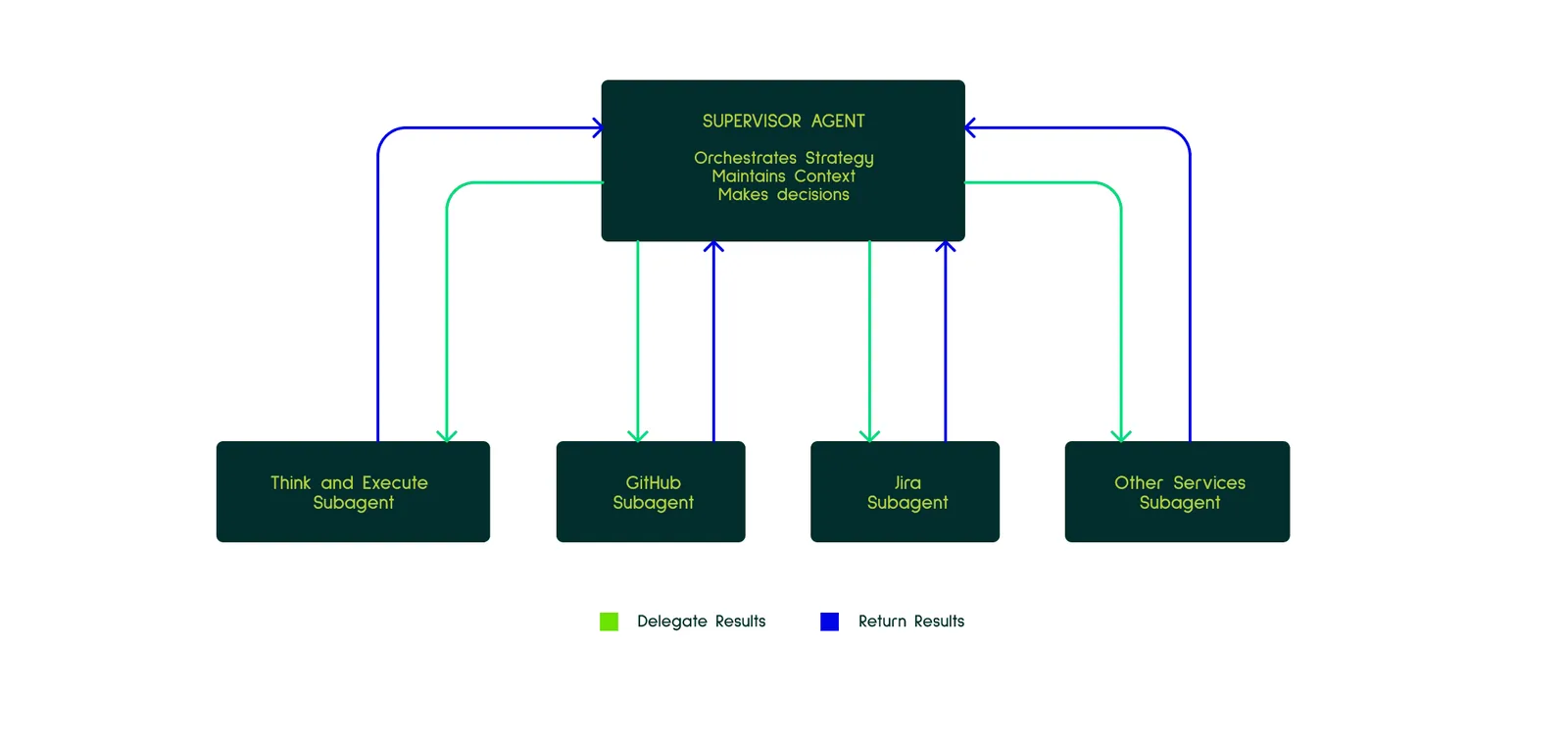
Important: We deliberately don't use specialized subagents like "context gatherers" or "verifiers." The supervisor maintains its own context and makes its own verification decisions.
Why This Architecture? Context Streamlining
The primary purpose of this design is to keep the supervisor's context lean and strategically organized.
What the Supervisor Maintains:
- Flow of its reasoning across the debugging process
- Key insights discovered during exploration
- Concise summary of what approaches were tried
- Current progress and next steps
- Relevant code snippets and codebase context
Why the Supervisor Keeps Code Context:
We experimented with delegating context gathering to subagents but found that gathered context is crucial for supervisor decision-making. Yes, this context can get messy during retrieval, but the solution isn't to push it all out of the main context—it's to manage relevant context better at the supervisor level. The supervisor needs to see code to make informed decisions about where to explore next, which hypotheses to pursue, and whether a solution is correct.
The Four Key Benefits
1. Clean Supervisor Context Through Strategic Delegation
When the supervisor delegates a task to a subagent, all the fine-grained details—tool calls, intermediate reasoning steps, failed attempts—stay in the subagent's context. The supervisor receives only the concise result of the task, which is what it actually needs to continue.
For example:
- Supervisor: "Fetch the implementation of the parse_query function"
- Subagent: [navigates file system, tries multiple searches, handles errors, fetches code]
- Supervisor receives: Just the function implementation
The supervisor's context doesn't contain the 15 tool calls the subagent made—just the outcome.
2. Tool Grouping and Abstraction
With too many tools and prompts, LLMs struggle to choose the right action. Subagents solve this by logically grouping tools:
- Rarely-used tools (GitHub API calls, Jira updates) live in specialized subagents
- The supervisor's tool list stays focused on core debugging operations
- LLMs make better decisions when they're not overwhelmed with 50+ tool options
3. Parallelization
Multiple subagents can work simultaneously on independent tasks:
- One subagent fetches code from multiple files
- Another analyzes test cases
- A third explores related issues
This speeds up execution significantly compared to sequential processing.
4. Clean Process History
The supervisor maintains a clear narrative of the debugging journey:
- "Explored authentication flow → Found mismatch in validation logic → Verified pattern in similar code → Designed fix → Implemented patch"
Not:
- "Called grep 47 times, fetched 12 files, ran code analysis on 8 functions, tried 3 different search patterns..."
The supervisor sees the forest, not every individual tree.
Strategic Delegation is Key
This architecture only works if the supervisor delegates thoughtfully:
- ✅ Delegate: "Fetch all test files related to authentication"
- ❌ Don't delegate: "Should we explore the auth module or the validation module next?" (This is a decision the supervisor needs to make)
The supervisor must retain enough context to reason about the problem while offloading mechanical execution to subagents.
Managing Context Over Time: The History Processor
Even with strategic subagent delegation, long-running debugging sessions accumulate context. An agent exploring dozens of files, testing multiple hypotheses, and iterating through solutions can easily hit context limits. Potpie's solution: a custom history processor that actively manages the message history throughout the agent run.
How It Works
The history processor monitors and maintains context dynamically:
- Threshold-based activation: Kicks in when context usage reaches around 40-45%
- Aggressive trimming: Removes older tool call results from the message history
- Re-callable information: If the agent needs previously trimmed information, it simply calls the tool again
- Continuous management: Keeps context usage around the 40-45% range throughout the entire run
- Applies to all agents: Both supervisor and subagents benefit from this context management
The Trade-offs
This approach has clear trade-offs:
Potential slowdown: If the agent needs previously retrieved information, it must fetch it again, adding latency
Increased reliability: Agents solve one task at a time with only the relevant information in current context
In practice, we've found the benefits far outweigh the occasional redundant fetch.
The Benefits
1. Focused Attention
- Agent works with what's relevant now, not everything it's seen across the entire run
- Reduces noise and cognitive load on the LLM
- Clearer task context leads to better decision-making
2. Consistent Token Usage
- No exponential context growth as the agent runs longer
- Token consumption stays predictable and manageable
- Makes it economically feasible to let agents run for extended periods
3. Reliable Long-Running Tasks
- Agents don't hit context limits mid-execution
- Can sustain deep investigation without degradation
- Tougher problems that require extended exploration remain solvable
4. Natural Problem-Solving Pace
- Harder problems naturally take more time to solve
- The agent isn't artificially constrained by context limits
- Mirrors how human developers work: complex bugs require more investigation
The Philosophy
This design embodies a key principle: tougher problems should require longer time to solve, and that's okay.
We're not optimizing for the fastest possible completion on easy instances. We're building an agent that can handle the hard cases—the bugs that require exploring multiple hypotheses, tracing complex execution flows, and verifying edge cases across the codebase.
The history processor enables this by ensuring the agent can run as long as needed without context degradation. It's the difference between an agent that gives up after 20 minutes because its context is polluted versus one that methodically works through a difficult problem for an hour and produces a correct solution.
Combined with our multi-agent architecture, the history processor creates a system that stays clean, focused, and effective throughout long debugging sessions. Context management isn't an afterthought—it's a core design principle that makes extended, systematic problem-solving possible.
Putting It All Together: Building Agents That Actually Work
Solving SWE Bench isn't about finding a magic prompt or throwing more compute at the problem. It's about building a complete system that addresses the fundamental challenges of automated debugging: understanding complex codebases, maintaining context over long runs, following systematic processes, and making decisions like an experienced developer.
Our approach with Potpie brings together multiple innovations:
- Knowledge graphs that provide semantic understanding of codebases, not just text matching
- Custom agents tailored specifically for debugging workflows with targeted tools and instructions
- Structured methodology enforced through todo and requirements tools that prevent shortcuts
- Multi-agent architecture that keeps context clean through strategic delegation
- Active context management via history processing that enables extended problem-solving sessions
- Principled debugging that fixes root causes, reuses patterns, and thinks like a repository maintainer
None of these pieces alone would be sufficient. It's the combination—the systematic approach, the semantic code understanding, the disciplined context management—that enables our agent to tackle real-world bugs effectively.
What's Next
SWE Bench remains a challenging benchmark, and we're continuously iterating on our approach. Every failed instance teaches us something about where our methodology breaks down, where our knowledge graphs need richer inference, or where our context management could be smarter.
We're building in the open because we believe the future of software development involves AI agents that truly understand code—not as sequences of tokens, but as systems with structure, semantics, and purpose. Potpie's knowledge graph foundation is core to that vision.
Try It Yourself
Potpie is open source and available now. Whether you're tackling SWE Bench, building your own coding agents, or just exploring what's possible with AI-powered development tools, we'd love to have you try us out.
Check out Potpie at potpie.ai and see how knowledge graphs can transform the way AI agents understand and work with code.